Introduction
This section is about main topics of the synQup Core project. We will cover the following topics:
- Setup
- Databases
- Setting MongoDB Indexes
- Using the Redis cache
- Creating an instance with a branch of the User Interface
- Logging
- JDM Configuration
- Flow configuration
The big picture
The current setup (core 2.0) consists of 6 parts:
- The user interface: It’s based on Javascript and vue.js.
- The synQup backend. It contains 5 containers:
- The PHP application (based on Symfony),
- MySQL as a relational database,
- MongoDB as a document-oriented database,
- Redis as a key-value store
- RabbitMQ as a message queue.
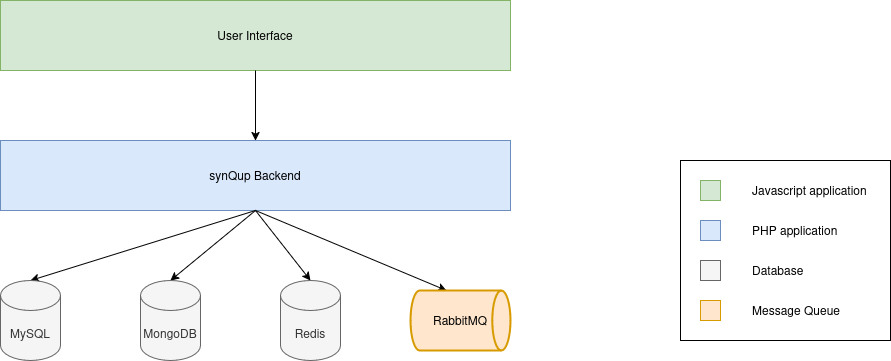
synQup backend
Currently, we are using a monolithic approach. The backend is a big PHP application based on composer autoloading and Symfony’s dependency injection component.
Components
synQup Core
This is the main application based on the Symfony framework. Every customer project uses this application and extends it with basic modules and customer modules.
Major components are:
- Process management:
- Definition of flows, Job Dispatcher Mappings (JDM), Process definitions, flow executions
- Execution of flows leveraging the Symfony Messenger component and RabbitMQ
- Administration:
- Administration of users, cron entries, flows, JDMs, etc.
- Display of information:
- Providing data for the dashboard, progress information, MongoDB data, …
- Main configuration:
- Configuring database connections (Doctrine), logging (Monolog), API endpoints (API Platform), …
- CI pipeline settings (Gitlab CI)
- Local docker container (describing the setup by docker-compose.yml)
- CLI tools
One of the key features is to have small work units that can be processed in parallel. The installed modules will therefore split up their work units into small packages that can be distributed to several workers. The workers will process all packages in parallel.
Data model
The data model is our general model of the e-commerce world. It orients on Shopware but it is designed to support as many Shops, ERPs, etc. as possible. Technically, it is a set of Doctrine MongoDB ODM document classes. It is tightly coupled with MongoDB at the moment.
The classes of the data model describe what properties and relations entities of the e-commerce world have. The product class for example contains prices, categories, taxes, shipping and so on.
The data model is a common “interface” for all of our components. All modules must have the same understanding of the data in MongoDB. It’s very relevant for all of the modules in synQup.
Theoretically, it can be interchangeably replaced with another data model that covers other domains, for example banking, insurance or healthcare.
Basic modules / Standard modules
Standard modules are in general integrations of source systems and target systems. They are serving a general purpose and are highly configurable. Without any doubt, the Shopware output module is the most important module in our portfolio. Other modules are Shopware input module, Oxid input module, Oxid output module, Akeneo input module. Besides those modules, we provide modules that are useful tools, for example integration module, image module.
Nearly all of the modules are working with the data model. Some exceptions are client modules, for example Shopware 6 Admin API client module.
Module extensions
Module extensions provide additional features to a module. They have to be installed together with the corresponding module.
The only module which is extendable with module extensions today is the Shopware output module. The most important module extension is the Shopware 6 Mapping extension which supports the integration of data that belongs to Shopware plug-ins.
Module extensions are an internal concept.
Customer modules
Customer modules are implementing customer-specific features. They get in touch will almost all other components and communicate with them in various ways.
One of the main scenarios is to import data from a customer’s system, store the data in our data model and export the data to Shopware. The customer modules will interact with our standard modules to transfer the data correctly to the destination.
Customer modules often install additional third party software.
Base packages
Base packages are an internal concept. The developers of the customer modules extracted recurring tasks to base packages. They are kind of an extension of customer modules. In theory, they could work without the customer module, but in general, it doesn’t make sense this way.