Worker reservation
State of the message queue before worker reservation
Before this feature, the message queue was quite fixed in terms of manual intervention. The message queue was only able to differentiate between the priority level: The levels pm, high, mid and low were supported. The messages had to implement one of the following interfaces to set the level of the message:
- TagPriorityPMInterface
- TagPriorityHighInterface
- TagPriorityMidInterface
- TagPriorityLowInterface
The workers started with a fixed setup. Each worker processed the transports pm, high, mid and low (in this priority). The way of consuming the messages was not flexible. The workers themselves decided which message to process next. This could lead to a situation where some high priority messages were not processed in time because the worker was busy.
Worker reservation
The worker reservation feature was introduced to make the message queue more flexible. The worker reservation feature allows a dynamic assignment of messages to transports. This is done by Symfony Expression Language. An assignment consists of a definition (a filter) which is written in the Symfony Expression Language. The filter is evaluated for each message in the queue. If the filter returns true, the message is assigned to the transport (or even multiple transports).
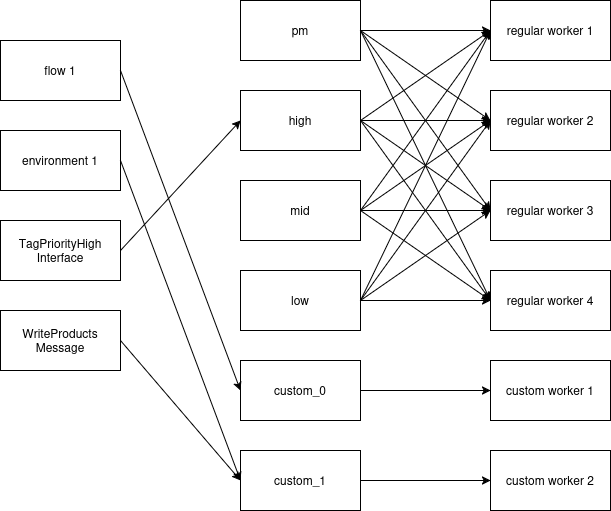
Transport configuration
The filters and the mapping to the transports is located in the database. We introduced a new table called
transport_configuration. This table contains the following columns:
| column | description |
|---|---|
| id | autoincrement id |
| name | Name of the transport configuration. It does not have any effect on the functionality. |
| description | Description of the transport configuration. It does not have any effect on the functionality. |
| filter | The filter definition written in the Symfony Expression Language. It's a JSON object. |
| transport | JSON object tto define the mapping to the transports. |
| order | The order of evaluation. |
By default, the table contains 5 entries to assign the messages to the transports pm, high, mid, low and default. This matches the old behavior. The default transport is used if no filter returns true. The entries are inserted by doctrine migrations. If you do not have these entries in your database, you can run the following command to insert them:
bin/console doctrine:migrations:execute DoctrineMigrations\\Version20240805061533 --dry-run
bin/console doctrine:migrations:execute DoctrineMigrations\\Version20240805061533
The filter
The filter can use some predefined variables. The following variables are available:
- moduleJobDispatchContext
- flow
- message
Examples:
Simulating the old behavior:
Fallback:
Filtering by flow id:
Filtering by message name:
["get_class(message) === 'Synqup\\Modules\\Shopware6Bundle\\Output\\Standard\\StartShopware6OutputMessage'"]
Filtering by environment:
Filtering by flow config:
The transport
Use this format to define the mapping to the transports:
The order
Be aware that the order is important. The filters are evaluated in the order of the order column. The first filter that returns true will be used. If no filter returns true, the message will be assigned to the default transport.
Setting up Worker Reservation manually (temporary solution)
To set up the worker reservation manually, you can use the following command:
- Update the supervisor config (/etc/supervisor/supervisord.conf):
Enter after the synqup-worker config the following lines:
[program:base-worker-reserved]
process_name=%(program_name)s_%(process_num)02d
# sleeps for 1sec so the container is up already
command=bash -c "sleep 1 && nice -n5 php -d memory_limit=%(ENV_MEMORY_PER_WORKER)s /var/www/html/bin/console messenger:consume custom_%(process_num)d --memory-limit=%(ENV_MEMORY_PER_WORKER_SOFT)s --time-limit=%(ENV_TIME_LIMIT_PER_WORKER)s --limit=%(ENV_MSG_LIMIT_PER_WORKER)s %(ENV_ADD_WORKER_FLAGS)s"
autostart=true
autorestart=true
# You can also try it using the environment variable, but generally, it is not set before starting the supervisord daemon.
numprocs=4
# Later on, we can use this config
# numprocs=%(ENV_MESSENGER_AMQP_CUSTOM_TRANSPORT_COUNT)s
stdout_logfile=/dev/stdout
stdout_logfile_maxbytes=0
stderr_logfile=/dev/stderr
stderr_logfile_maxbytes=0
- Set environment variables:
# adjust these lines to your needs and add or remove more custom transports
export MESSENGER_AMQP_TRANSPORT=pm,job_high,job_mid,job_low,custom_0,custom_1,custom_2,custom_3
export MESSENGER_AMQP_CUSTOM_TRANSPORT_COUNT=4
These environment variables should win over the ones configured in .env or .env.local. However, you might need to adjust these environment variables in these files, too.
- Clear the synfony cache:
- Restart the supervisor
supervisorctl stop all
supervisorctl reread
supervisorctl update
supervisorctl start all
supervisorctl status
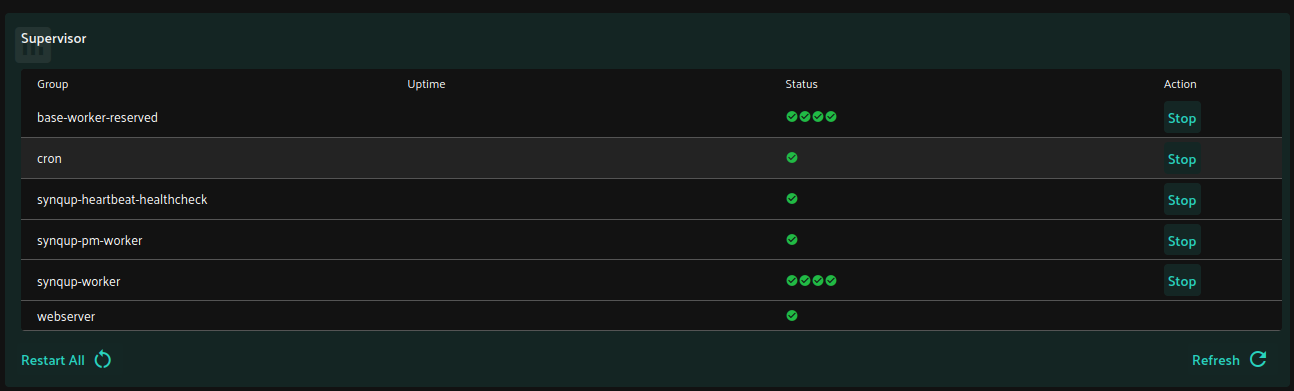
The last command should show the new worker processes. They should have the state "RUNNING". You can also check the dashboard in the user interface. It should show the new worker processes.
Local development
To test the worker reservation feature locally, you can use the following command: